Forecast
This interface grants you access to forecasts information in AClimate. Tailored for developers, researchers, and stakeholders, it provides detailed climate predictions (seasonal and subseaonal) for informed decision-making. Retrieve essential weather parameters such as temperature, precipitation and solar radiation, and more. It also provides agroclimatic information for different crops.
Climate
Through this endpoint you can obtain the information obtained through the forecast process, the probabilities and the climatic scenarios. This endpoint is used through the Http GET method.
To make use of this endpoint you must follow the following steps:
This endpoint is made up of the base_URL + /api + /Forecast/Climate/ (https://webapi.aclimate.org/api/Forecast/Climate/)
This endpoint needs two parameters:
weather_stations: You must enter the id of the weather station from which you want to get the information, if you want to obtain forecast information for different stations, you must separate each Id by “,”.
probabilities: If this parameter is true it will show the information of the probabilities if it is false it will show the information of the climatic scenarios in the csv format.
format: to learn more about format parameter click here format.
The endpoint must follow the following format https://webapi.aclimate.org/api/Forecast/Climate/{weather_stations}/{probabilities}/{format}
Examples:
Parameter |
Description |
Type |
|---|---|---|
forecast |
Indicates the id of the forecast to which the data belongs. |
ObjectId |
confidence |
This parameter indicates the confidence value for the intervals confidence. |
Double |
climate |
To learn more click here Climate. |
Array of climates. |
scenario |
To learn more click here Scenario. |
Array of scenarios. |
Parameter |
Description |
Type |
|---|---|---|
weather_station |
This parameter indicates the ID of the weather station to which the forecast data belongs. |
ObjectId |
performance |
To learn more click here Performance. |
Array of performance |
data |
To learn more click here Data - Climate. |
Array of data |
Parameter |
Description |
Type |
|---|---|---|
weather_station |
This parameter indicates the ID of the weather station to which the forecast data belongs. |
ObjectId |
name |
This parameter indicates the ID of the forecast to which the forecast data belongs. |
String |
year |
This parameter indicates the ID of the weather station to which the forecast data belongs. |
Integer |
monthly_data |
To learn more click here monthly_data. |
Array of monthly data |
Parameter |
Description |
Type |
|---|---|---|
year |
It represents the year to which the probabilities correspond. |
Integer |
month |
It represents the month to which the probabilities correspond. |
Integer |
probabilities |
To learn more click here probability. |
Array of probabilities |
year |
It represents the year to which the perfomance correspond. |
Integer |
|---|---|---|
month |
It represents the month to which the perfomance correspond. |
Integer |
name |
It represents the name to which the perfomance correspond. |
String |
value |
It represents the value of the performance. |
Double |
Parameter |
Description |
Type |
|---|---|---|
month |
Represents the month |
Integer |
data |
Contains each variable with its respective value |
Array of data |
data.measure |
Variable name |
String |
data.value |
Variable value |
Double |
JSON format example:

CSV format example when probabilities is true:

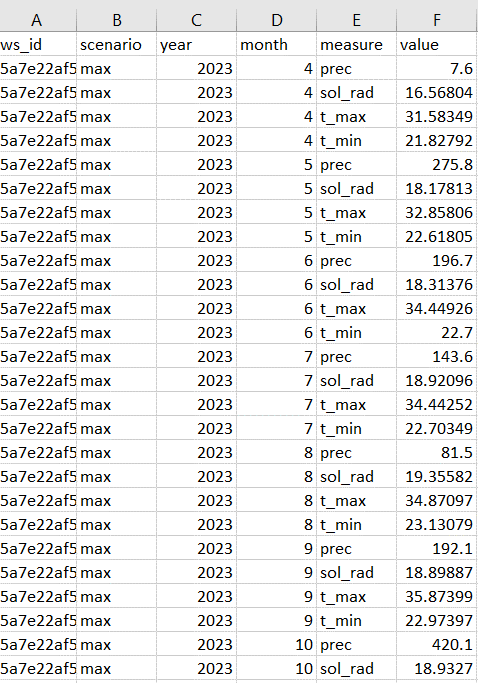
CSV format example when probabilities is false:
Yield
Through this endpoint you can obtain the information obtained through the crop model process, yield data. This endpoint is used through the Http GET method.
Note
The model output information will be obtained for each combination of cultivar and soil that successfully completes the process. The cultivars and soils correspond to those presented in the Agronimic endpoint, but it does not mean that all the cultivars and soils must be present for each point of a certain crop, since for different seasons the points may vary in the result of the different combinations.
To make use of this endpoint you must follow the following steps:
This endpoint is made up of the base_URL + /api + /Forecast/Yield/ (https://webapi.aclimate.org/api/Forecast/Yield/)
This endpoint needs two parameters:
weather_stations: You must enter the id of the weather station from which you want to get the information, if you want to obtain yield data obtained from the crop model for different stations, you must separate each Id by “,”.
format: to learn more about format parameter click here format.
The endpoint must follow the following format https://webapi.aclimate.org/api/Forecast/Yield/{weather_stations}/{format}
Examples:
Parameter |
Description |
Type |
|---|---|---|
forecast |
Indicates the id of the forecast to which the data belongs. |
ObjectId |
confidence |
This parameter indicates the confidence value for the intervals confidence. |
Double |
yield |
To learn more click here Yield. |
Array of yield. |
Parameter |
Description |
Type |
|---|---|---|
weather_station |
This parameter indicates the ID of the weather station to which the forecast data belongs. |
ObjectId |
yield |
To learn more click here Yield Crop. |
Array of yield crop |
Parameter |
Description |
Type |
|---|---|---|
cultivar |
It is the cultivar id of the cultivar to which the yield data belongs. |
ObjectId |
soil |
It is the soil id of the soil to which the yield data belongs. |
ObjectId |
start |
Corresponds to the simulation start date. |
Date |
end |
Corresponds to the simulation end date. |
Date |
data |
To learn more click here yield_data_forecast. |
Array of yield data |
Parameter |
Definition |
Type |
|---|---|---|
measure |
Name of the measured variable, To learn more click here Measuares Definition Forecast |
MeasureYield |
avg |
average |
Double |
median |
median |
Double |
min |
minimum value |
Double |
max |
maximum value |
Double |
quar_1 |
quartile 1 |
Double |
quar_2 |
quartile 2 |
Double |
quar_3 |
quartile 3 |
Double |
conf_lower |
lower confidence interval limit |
Double |
conf_upper |
upper confidence interval limit |
Double |
sd |
standard deviation |
Double |
perc_5 |
5th percentile |
Double |
perc_95 |
95th percentile |
Double |
coef_var |
coefficient of variation |
Double |
JSON format example:

CSV format example:

Measuare |
Long name |
Comments |
|---|---|---|
yield_14 |
yield kg/ha to 14% humidity |
|
yield_0 |
yield kg/ha to 0% humidity |
|
d_har |
days to harvest |
|
d_dry |
days to start grain drying |
|
prec_acu |
Cumulative precipitation for the crop cycle |
|
t_max_acu |
cumulative maximum temperature |
|
t_min_acu |
cumulative minimum temperature |
|
bio_acu |
Total aboveground biomass accumulated |
|
et_acu |
Cumulative Evapotranspiration |
|
land_pre_day |
Land preparation day |
When the value is -1 it indicates that the soil is very wet, which is why the machinery cannot be used on this soil. |
st_ger_boo_n |
Nitrogen stress germination to booting |
|
st_boo_ant_n |
Nitrogen stress booting to anthesis |
|
st_beg_end_gf_n |
nitrogen stress beginning to end of grain filling |
|
st_ger_boo_w |
Water stress germination to booting |
|
st_boo_ant_w |
Water stress booting to anthesis |
|
st_beg_end_gf_w |
water stress beginning to end of grain filling |
|
st_ger_ant_n |
nitrogen stress germination to anthesis |
|
st_ger_ant_w |
water stress germination to anthesis |
|
hs_hb_s_e |
Hydrological balance between sowing and emergence |
|
hs_hb_t |
Hydrological balance during tillering |
|
hs_hb_ei_b |
Hydrological balance between beginning of stem elongation period and end of booting |
|
hs_hb_bh_m |
Hydrological balance between beginning of heading and full maturity |
|
hs_hb_s_m |
Hydrological balance between sowing and full maturity |
|
hs_ra_s |
Rainfall amount during pre-sowing period |
|
hs_ndr10_t |
Number of rainy days with rain above 10 mm during tillering |
|
hs_ndr40_t |
Number of rainy days with rain above 40 mm during tillering |
|
hs_ndr5_h_m |
Number of days with rain above 5 mm between heading and full maturity |
|
hs_ndr40_bh_m |
Number of days with rain above 40 mm between heading and full maturity |
|
hs_cdr5_h_f |
Maximum number of consecutive days with rain above 5 mm between heading and flowering |
|
hs_cdr5_f_m |
Maximum number of consecutive days with rain above 5 mm between flowering and full maturity |
|
hs_ndt2_b_f |
Number of days with minimum daily temperature below 2 °C between booting and flowering |
|
hs_ndt28_b_f |
Number of hot days with maximum daily temperature above 28 °C between beginning of stem elongation period and flowering |
YieldExceedance
Through this endpoint you can obtain the information obtained through of all forecast in the crop model process, yield data. This endpoint is used through the Http GET method.
To make use of this endpoint you must follow the following steps:
This endpoint is made up of the base_URL + /api + /Forecast/YieldExceedance/ (https://webapi.aclimate.org/api/Forecast/YieldExceedance/)
This endpoint needs two parameters:
weather_stations: You must enter the id of the weather station from which you want to get the information, if you want to obtain yield data obtained from the forecast for different stations, you must separate each Id by “,”.
format: to learn more about format parameter click here format.
The endpoint must follow the following format https://webapi.aclimate.org/api/Forecast/YieldExceedance/{weather_stations}/{format}
Examples:
Parameter |
Description |
Type |
|---|---|---|
forecast |
Indicates the id of the forecast to which the data belongs. Contains multiple forecast Ids separated by “,”. |
ObjectId |
confidence |
This parameter indicates the confidence value for the intervals confidence. |
Double |
yield |
To learn more click here Yield. |
Array of yield. |
JSON format example:

CSV format example:

SubseasonalWS
Through this endpoint you can obtain the information obtained through the forecast process for subseasonal, the probabilities and the climatic scenarios. This endpoint is used through the Http GET method.
To make use of this endpoint you must follow the following steps:
This endpoint is made up of the base_URL + /api + /Forecast/SubseasonalWS/ (https://webapi.aclimate.org/api/Forecast/SubseasonalWS/)
This endpoint needs two parameters:
weather_stations: You must enter the id of the weather station from which you want to get the information, if you want to obtain forecast information for different stations, you must separate each Id by “,”.
format: to learn more about format parameter click here format.
The endpoint must follow the following format https://webapi.aclimate.org/api/Forecast/SubseasonalWS/{weather_stations}/{format}
Examples:
Parameter |
Description |
Type |
|---|---|---|
forecast |
Indicates the id of the forecast to which the data belongs. |
ObjectId |
confidence |
This parameter indicates the confidence value for the intervals confidence. |
Double |
climate |
To learn more click here Climate Subseasonal. |
Array of climates. |
Parameter |
Description |
Type |
|---|---|---|
weather_station |
This parameter indicates the ID of the weather station to which the forecast data belongs. |
ObjectId |
data |
To learn more click here Subseasonal Data - Climate. |
Array of data |
Parameter |
Description |
Type |
|---|---|---|
year |
It represents the year to which the probabilities correspond. |
Integer |
month |
It represents the month to which the probabilities correspond. |
Integer |
week |
It represents the week to which the probabilities correspond. |
Integer |
probabilities |
To learn more click here probability. |
Array of probabilities |
JSON format example:

CSV format example:

Historical
Through this endpoint you can obtains the forecast information for a specific year indicated in the parameters. This endpoint is used through the Http GET method.
To make use of this endpoint you must follow the following steps:
This endpoint is made up of the base_URL + /api + /Forecast/Log/ (https://webapi.aclimate.org/api/Forecast/Log/)
This endpoint needs two parameters:
year: The year from which the forecast information will be obtained.
format: to learn more about format parameter click here format.
The endpoint must follow the following format https://webapi.aclimate.org/api/Forecast/Log/{year}/{format}
Examples:
Parameter |
Description |
Type |
|---|---|---|
id |
Indicates the id of the forecast. |
ObjectId |
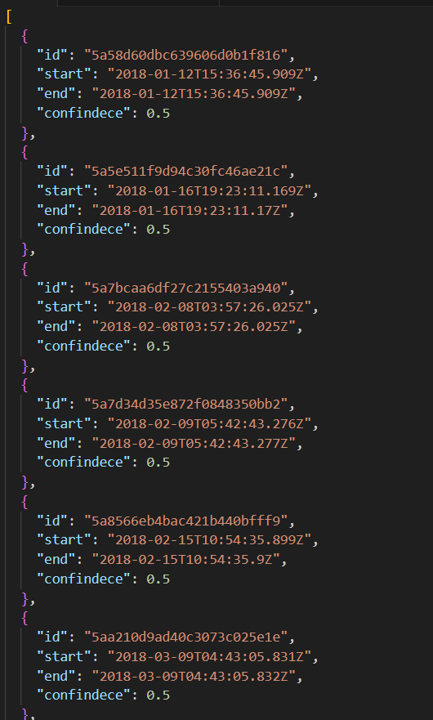
start |
Corresponds to the start date of the forecast. |
Date |
end |
Corresponds to the end date of the forecast. |
Date |
confindece |
This parameter indicates the confidence value for the intervals confidence. |
Double. |
JSON format example:
CSV format example:

YieldPrevious
Through this endpoint you can obtains the forecast information for a specific forecast indicated in the parameters. This endpoint is used through the Http GET method.
To make use of this endpoint you must follow the following steps:
This endpoint is made up of the base_URL + /api + /Forecast/YieldPrevious/ (https://webapi.aclimate.org/api/Forecast/YieldPrevious/)
This endpoint needs two parameters:
forecast: Represents the id of the forecast from which the information is desired.
weather_stations: You must enter the id of the weather station from which you want to get the information, if you want to obtain forecast information for different stations, you must separate each Id by “,”.
format: to learn more about format parameter click here format.
The endpoint must follow the following format https://webapi.aclimate.org/api/Forecast/YieldPrevious/{forecast}/{weather_stations}/{format}
Examples:
Parameter |
Description |
Type |
|---|---|---|
forecast |
Indicates the id of the forecast to which the data belongs. |
ObjectId |
confidence |
This parameter indicates the confidence value for the intervals confidence. |
Double |
yield |
To learn more click here Yield. |
Array of yield. |
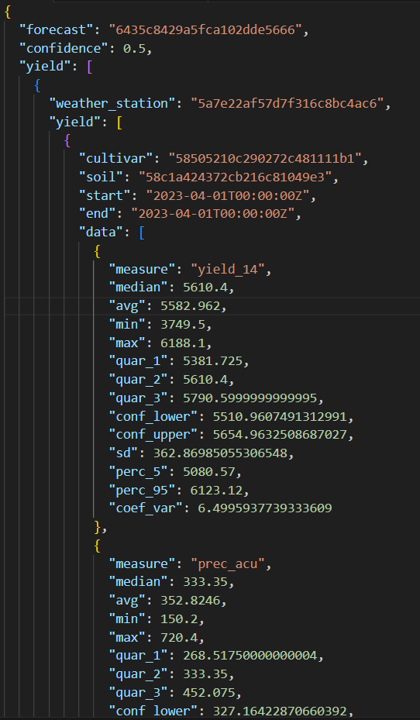
JSON format example:
CSV format example:

Climate Previous
Through this endpoint you can obtain the information obtained through the forecast process that is desired by means of the Id, the seasonal and subseasonal probabilities and the climatic scenarios. This endpoint is used through the Http GET method.
To make use of this endpoint you must follow the following steps:
This endpoint is made up of the base_URL + /api + /Forecast/ClimatePrevious/ (https://webapi.aclimate.org/api/Forecast/ClimatePrevious/)
This endpoint needs two parameters:
forecast: Represents the id of the forecast from which the information is desired.
weather_stations: You must enter the id of the weather station from which you want to get the information, if you want to obtain forecast information for different stations, you must separate each Id by “,”.
probabilities: If this parameter is true it will show the information of the probabilities if it is false it will show the information of the climatic scenarios in the csv format.
format: to learn more about format parameter click here format.
The endpoint must follow the following format https://webapi.aclimate.org/api/Forecast/ClimatePrevious/{forecast}/{weather_stations}/{probabilities}/{format}
Examples:
Parameter |
Description |
Type |
|---|---|---|
forecast |
Indicates the id of the forecast to which the data belongs. |
ObjectId |
confidence |
This parameter indicates the confidence value for the intervals confidence. |
Double |
climate |
To learn more click here Climate Previous. |
Array of climates. |
scenario |
To learn more click here Scenario. |
Array of scenarios. |
Parameter |
Description |
Type |
|---|---|---|
weather_station |
This parameter indicates the ID of the weather station to which the forecast data belongs. |
ObjectId |
performance |
To learn more click here Performance. |
Array of performance |
data |
To learn more click here Data - Climate. |
Array of data |
subseasonal_data |
To learn more click here Subseasonal Data - Climate. |
Array of data |
JSON format example:

JSON format example 2:

CSV format example when probabilities is false:
